


Graduation Announcements with QR Code: The Clever Trend Every Grad Should Try
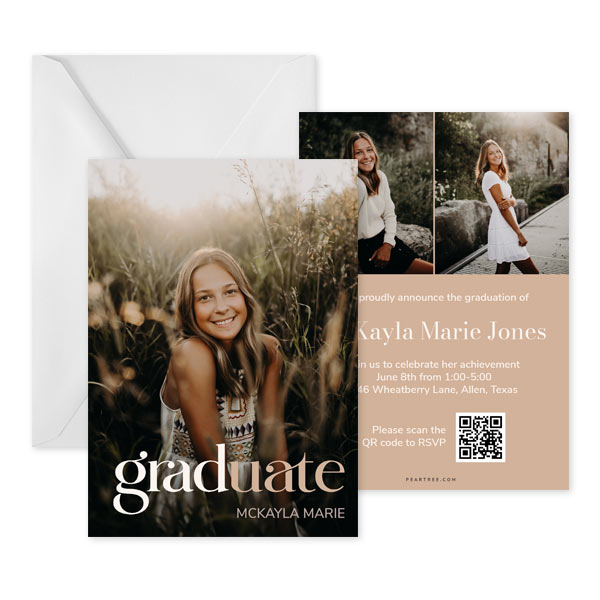
Featured Graduation Announcement: Tonal Grad
Graduation season is basically one big “pinch me” moment — the caps, the gowns, the tassel flips, the proud-parent tears. And while traditional announcements still hold a sweet spot in our hearts, modern grads are putting their own tech-savvy spin on things. Enter: graduation announcements with QR code options, the clever little upgrade you didn’t know you needed…until now.
If you’re looking to add a QR code to an invitation or announcement, you’re about to unlock a whole world of creative, “wow, that’s genius” possibilities. Let’s break it all down — from why QR codes work, to how to use them, to all the fun ways they make your grad’s big moment shine even brighter.
From Traditional to Tech-Savvy: A Quick Look at How Graduation Announcements Have Evolved
Once upon a time (in a land before smartphones), graduation announcements were beautifully simple: a name, a school, a ceremony date, and maybe a senior portrait if you splurged. Today’s announcements? Oh, they’re next level.
Modern grads want designs that feel personal, fun, and uniquely them. Think bold colors, photo collages, aesthetic layouts, foil accents — and now, a new star guest: the QR code.
Adding digital elements to paper announcements has become totally normal. QR codes bridge the gap between nostalgic snail mail and the digital world your grad basically lives in. They’re sleek, small, and do a whole lot more heavy lifting than you’d expect.
What Goes on a Graduation Announcement? A Quick Refresher
Before we jump into the tech, let’s make sure the basics are covered. A graduation announcement and grad party invitation typically includes:
- The graduate’s name
- Their school
- Graduation year
- Degree, major, or academic highlights (optional)
- Photo(s), because obviously
- Ceremony and/or Party details (optional — many announcements simply share the news, not an invite)
Add a stylish Pear Tree design and you’ve got a keepsake-worthy piece of happy mail. But when you add a QR code to an invitation or announcement? You’re creating something even more dynamic.
What Is a QR Code, Anyway? (And How Do Recipients Use It?)
QR codes are those little pixel-y squares you see everywhere — restaurant menus, event posters, and probably on your grad’s homework at some point. They act like tiny portals that instantly link people to something online.
For your recipients, interacting with a QR code couldn’t be easier. They simply:
- Open their phone’s camera
- Point it at the QR code
- Tap the link that pops up
Boom! Instant info, photos, RSVPs — you name it.
How to Add a QR Code to Your Graduation Announcement

Featured Graduation Announcement: Clean Type
Good news: adding a QR code on Pear Tree is ridiculously easy. In our editor, you can generate one right on your announcement or on a separate insert card. No third-party tools, no fuss, no “ummmm how do I make this work?” panic required.
Just enter the link you want the QR code to point to, place it anywhere on your card layout, and you’re done. Seriously — it’s that simple.
Genius Ways to Use QR Codes on Graduation Announcements
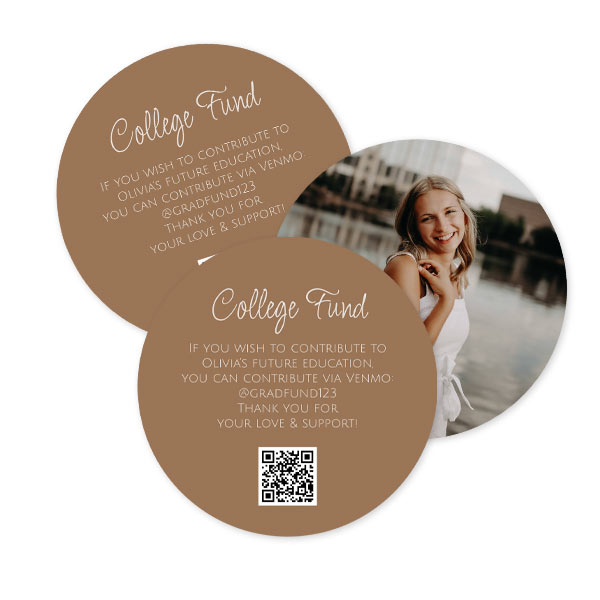
Featured Graduation Insert Card: Simple Class
Here’s where it gets fun. There are so many clever ways to bring QR codes into your grad’s big moment. Whether your announcement is purely informational or doubles as a party invite, these ideas make the experience unforgettable.
1. Link to a Livestream of the Graduation Ceremony
Every grad knows there’s always someone who can’t attend — grandparents across the country, a cousin who’s working, or that neighbor who basically helped raise them. Add a QR code that links to the official livestream, and suddenly everyone gets a front-row seat.
2. Share a Senior Photo Gallery
A printed announcement can only hold so many photos, but a QR code? Unlimited.
Link to:
- A senior portrait gallery
- Their favorite candid shots
- A highlight reel video
- A “year in review” slideshow
Family members love this one (prepare your inbox for 47 heart emojis from Aunt Karen).
3. Send Guests to a Facebook Event or Online RSVP Form
Planning a grad party? Go digital with the RSVPs.
Link your QR code to:
- A Facebook event
- A Google Form
- A party website
Guests RSVP with one tap, you track it all in one place, and you get to skip deciphering scribbled handwriting on mailed cards. Win-win-win.
4. Connect to an Amazon Wishlist for Dorm Room Essentials
This is a modern classic — and honestly, genius.
Have your grad build a wishlist with everything they actually need for college: towels, noise-canceling headphones, ramen bowl sets, command strips (soo many command strips).
Include a QR code linking to the wishlist, and friends and family can shop instantly. Everyone loves gifting something useful!
5. Make It Easy to Gift Cash (Because Grads Can Always Use It)
Cash apps = your grad’s love language.
Your QR code can link to:
- Venmo
- CashApp
- PayPal
Recipients appreciate the convenience, and your grad gets a little extra cushion for books, burritos, and everything in between.
6. Link to a Personal Website or Digital Portfolio
For grads heading into creative fields — graphic design, photography, writing, coding — this is a power move. Showcase:
- A digital resume
- Portfolio pieces
- Awards and achievements
- A “meet the grad” page
It’s perfect for future employers, relatives, and anyone rooting for their next big step.
7. Add a QR Code That Takes Guests Directly to Directions
If your ceremony or party location isn’t exactly intuitive (looking at you, stadium parking lot C), this is a lifesaver. Link the QR code to Google Maps and spare your guests the “Wait, which entrance?” text messages.
Tips for Making Your QR Code Look Great
A few design reminders to keep things polished:
- Keep it on a clean background so phones read it easily
- Don’t shrink it too small; if you can read it, your recipients can too
- Place it where it feels intentional — not floating in random space
- Add a little label like “Scan Me!” or “See More!” so people know what it’s for
Ready to Get Creative? Your Announcement Just Got Smarter.
Graduation announcements with QR code options are seriously one of the coolest ways to blend tradition with modern magic. They make your grad announcements more helpful, more interactive, and so much more you.
When you’re ready to design yours, Pear Tree’s editor makes it quick, fun, and totally foolproof. Go ahead — add a QR code to an invitation and give your recipients something to scan, smile at, and celebrate.